
I tackled a real challenge this week – something new! And it didn’t go all that well to start with.
Where I’m at
I’ve got a simple UI in place for contract selection, and for scheduling. The scheduler doesn’t actually change the data of the game, it just moves it’s own models about, but it’s in there and functions fairly well.
What I Planned
The plan for this week was to continue working on the UI, with the specific aim to get a ugly, but functional contract selection screen and scheduler in place. My thoughts were that this would functionally complete the majority of the third prototype, and allow me to figure out if it’s viable or needs more work, and which way to steer it if that is the case.
What Actually Happened
The week started off pretty bad. I have an idea for the basics, but struggled a lot with getting something put on the screen in the first place. I suspect a similar pattern to my first weekly review on starting Unity from fresh, or maybe not. I have a lot of ideas on that subject matter, but not a whole lot by way of answers, so I’ll leave it there for now.
By Wednesday, I had managed to break through whatever that blocker was and get some meaningful progress started. The remainder of the week was spent developing the UI windows for contracts and schedule (mostly scheduling, the contract window was simple enough)
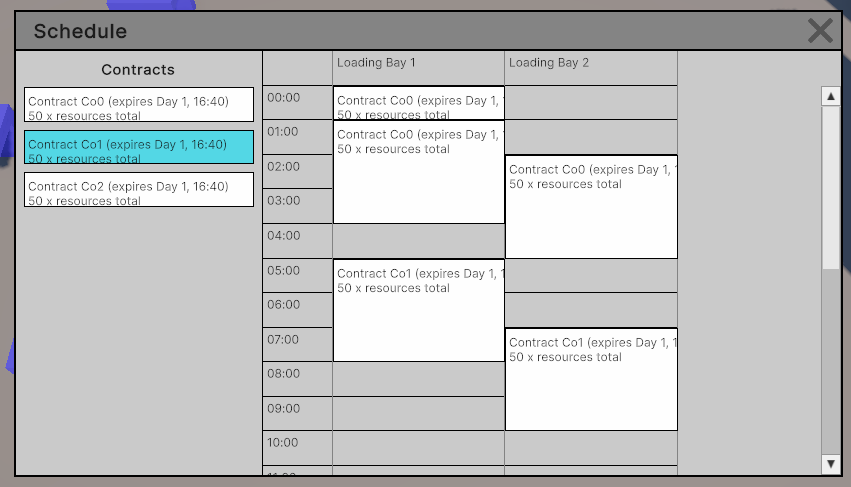
The scheduling window now shows a little ‘ghost’ icon when placing, and highlights red or green to suggest valid or invalid placement. The last thing to do to get this UI up and running is to link it to actual contracts and the schedule so it will actually do things! This is where things will get particularly messy, no doubt.
What Went Wrong
Two days were almost completely lost, and I don’t really have a great idea of why. My current suspicions are a mixture of:
- Lack of fluency in the ‘primitive’ aspects of UI toolkit and how to interact with it
- A high-level overview of what I want and how I want it to work
- Trying to design a generic solution that gets this working for anything (in particular, I want to avoid duplicating data storage where possible to ensure the UI is up to date with the simulation’s data)
The last element, I think, is the key issue (and also the part that links the other two). I tried to design the architecture of the UI code without really knowing the basics, and as such, I couldn’t really make any meaningful decisions. Maybe it’s just an element of perfectionism, but I can probably bet that this sort of thing will show up again in the future.
What Went Right
I’m feeling a little proud of the schedule UI so far. Like everything else, it’s a little rough around the edges and definitely isn’t feature-complete, but what is in there seems to work fairly well. It’s responsive and the feedback makes interacting with the UI feel intuitive, and I’m quite pleased with the end result of what I have put in place.
What Next?
The final step for this prototype is to link the UI to the data and have the buttons and clicks actually change the game. Once that’s done, the difficult questions need answering – what is the result of the prototype, and what’s the direction going forward for the game? I’m feeling a little nervous about that one, because I don’t have a clear idea of what I’m looking for yet. At this stage, I’ll simply need to pay attention to what elements of the game trigger different reactions, and base it off those reactions.